
I’ve been spamming TBC heroics as a warrior tank. At the tempo these groups move, you don’t have time to type. You’re chain-pulling, tab-sundering, watching healer mana — and somewhere in there you need to tell the group to CC moon or hold DPS. Stopping to type means slowing the group down.
So I built CommanderText — buttons that send the right message to the right channel in one click.
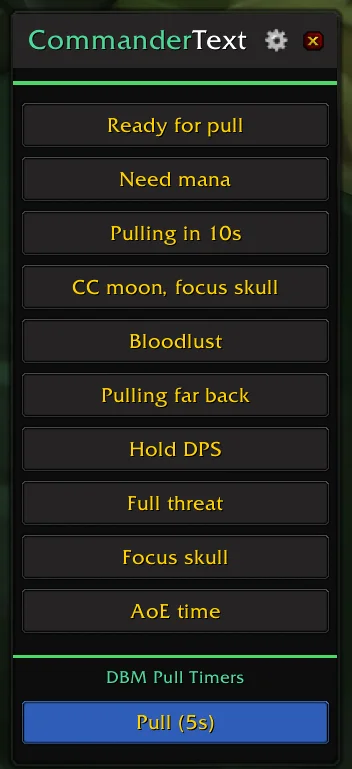
The Idea
A small overlay with message buttons. Left-click sends to the appropriate chat. Right-click sends as a raid warning. The addon figures out the channel — raid if you’re in a raid, party if you’re in a party, say if you’re solo.
I also wanted DBM pull timer buttons. Instead of typing /pull 10, one click: Pull (10s), Pull (15s). Done.
That’s the whole addon. No data sync, no saved history. Just buttons that send messages.
Message Pools
A static message per button gets old fast. Your group sees the same string 10 times in a dungeon run. So each button has a label and a pool of 5 variations:
{
    label = "Hold DPS",
    pool = {
        "Hold DPS, building threat",
        "Wait for threat please",
        "Let me build threat first",
        "Hold DPS, need aggro",
        "Wait for Sunders",
    },
    order = 7
}
Every click picks a random variation. In r4 I added no-repeat logic — it tracks the last sent index so you never get the same phrase twice in a row. Makes the callouts feel like you’re actually typing them. The only tell is that you’re mid-pull and can’t possibly be at the keyboard.
The Settings Panel
The settings panel ended up bigger than the addon itself:
- Overlay: width, background opacity, content opacity, lock position, frame layer
- Minimap: show/hide toggle, reset position
- Pull timers: checkboxes for 5s/10s/15s/20s/30s
- Messages: add, reorder, hide, delete with confirmation
Everything scrolls. Each message row has inline controls — move up, move down, hide from overlay without deleting, or nuke it.
Smart Channel Detection
The buttons just work regardless of group state. Left-click auto-detects — raid chat, party chat, or say. Right-click attempts a raid warning but falls back gracefully. Not in a raid? Party. Not leader or assistant? Regular raid chat.
The Ready Check button only shows when you’re leader or assistant. Promote someone else? It disappears instantly.
Four Releases in One Day
Nothing to r4 in a single day:
- 1.0.0: Core overlay with message buttons and pull timers
- r2: Full settings panel — sliders, message management, pull timer config
- r3: Minimap button polish (middle-click hide, right-click settings)
- r4: New default messages, no-repeat randomization
r2 was the heavy lift. Everything after that came from actually using the addon while grinding dungeons.
The Result
CommanderText does one thing well. It sits in the corner during dungeon runs and saves me from typing the same callouts fifty times a night. The message pools make it feel natural, and the settings panel gives enough control without bloating a 1,600-line addon.
Sometimes the right addon is the one that replaces a keyboard with a button.